Thanks To Hamzairshad
http://forum.xda-developers.com/member.php?u=2094554
How to Root Mt6575 Gfive Luminous E660 Gingerbread 2.3.5)
Releasing The Rooting Method of GfIve Luminous E660 Gingerbread 2.3.5 Mt6575:)
Guide
1. First You Need To download the files from Dropbox.
2. Install usb vcom driver for mt65xx
3. Open Sp Flash tool click scatter loading and load MT6575_Android_scatter.txt file.
4. Now Tick The Recovery and choose file Recovery(cwm).img
![]()
Note: Make sure Only recovery is checked
5. Now Turn Off your mobile take out the battery then click on download button of sp flash tool and connect your mobile
through usb without battery
![]()
6. when sp flash tool found your device let it complete do not do anything until you see the green circle
![]()
7. After flashing cwm hold Vol+ and power button now choose wipe data and then wipe cache
![]()
8. After this choose apply update from sd card and choose CWM-SuperSU-v1.04
9. When its done say Thank God.. Becoz Now you Rooted:)
Note: Make sure Only recovery is checked
Thats it
Tools https://www.dropbox.com/sh/7to2av99gll5gum/AUOgYbAhcK
Thanks To Hamzairshad http://forum.xda-developers.com/member.php?u=2094554
http://forum.xda-developers.com/member.php?u=2094554
How to Root Mt6575 Gfive Luminous E660 Gingerbread 2.3.5)
Releasing The Rooting Method of GfIve Luminous E660 Gingerbread 2.3.5 Mt6575:)
Guide
1. First You Need To download the files from Dropbox.
2. Install usb vcom driver for mt65xx
3. Open Sp Flash tool click scatter loading and load MT6575_Android_scatter.txt file.
4. Now Tick The Recovery and choose file Recovery(cwm).img
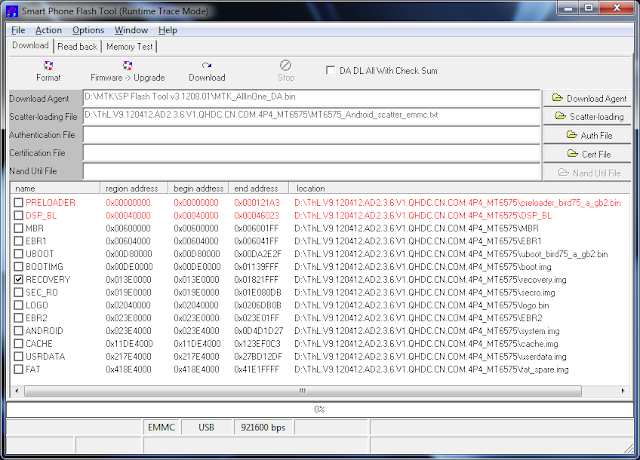
Note: Make sure Only recovery is checked
5. Now Turn Off your mobile take out the battery then click on download button of sp flash tool and connect your mobile
through usb without battery

6. when sp flash tool found your device let it complete do not do anything until you see the green circle

7. After flashing cwm hold Vol+ and power button now choose wipe data and then wipe cache

8. After this choose apply update from sd card and choose CWM-SuperSU-v1.04
9. When its done say Thank God.. Becoz Now you Rooted:)
Note: Make sure Only recovery is checked
Thats it
Tools https://www.dropbox.com/sh/7to2av99gll5gum/AUOgYbAhcK
Thanks To Hamzairshad http://forum.xda-developers.com/member.php?u=2094554