How To Decompiling Or Editing Android's APK
![]()
step 1 : first apk file rename and last .zip to create zip file.
step 2 : then open *.zip file and classes.dex copy to dex2jar-0.0.9.9 folder.
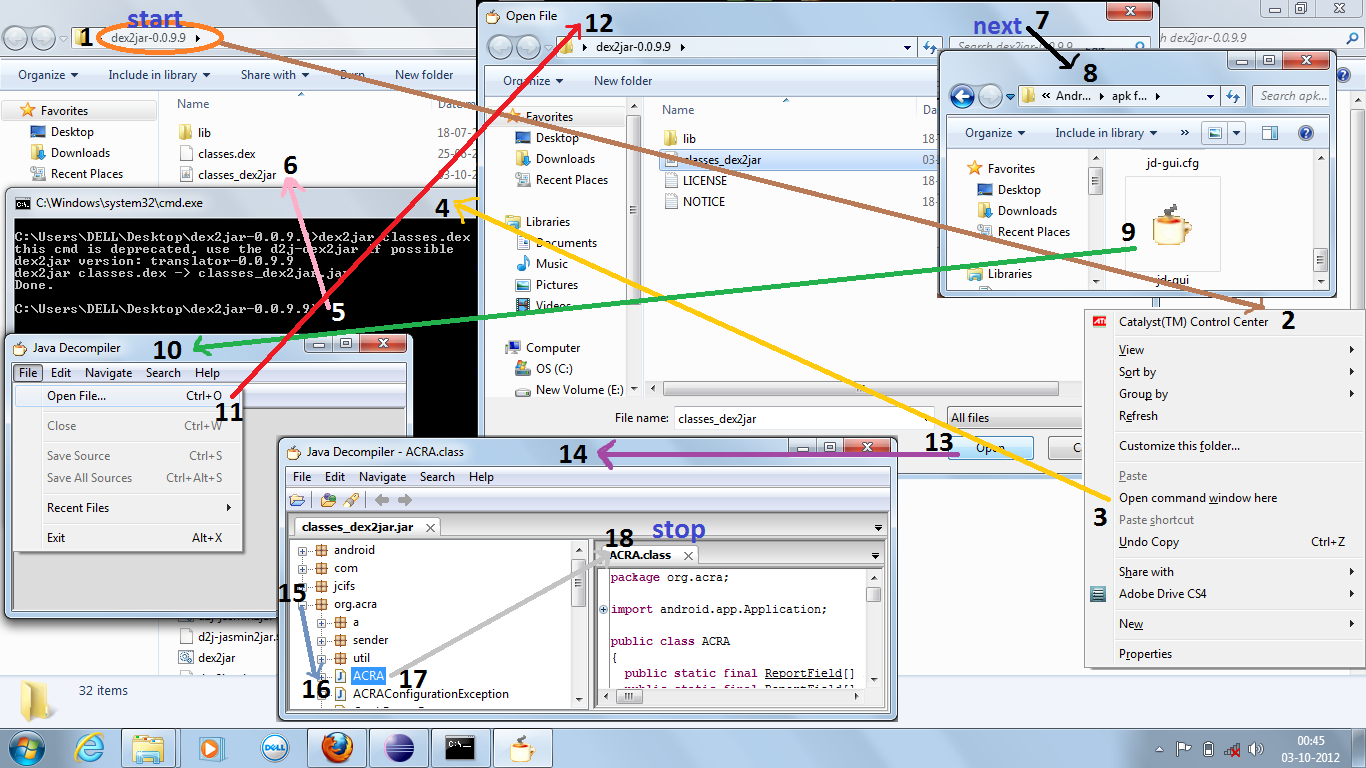
step 3 : then folder on shift+right aerow and click open command window here.\
step 4 : then write on cmd in dex2jar classes.dex and enter press. this process is given on images.
step 5 : then getting classes_dex2jar file.
step 6 : then open jd-gui application and open file-> open file and open classes_dex2jar file.
step 7 : getting the code of application.
For Download This Software::
Click Here...
If You liked my work,Atleast Click Thanks Button,its Free,It encourages me.
step 1 : first apk file rename and last .zip to create zip file.
step 2 : then open *.zip file and classes.dex copy to dex2jar-0.0.9.9 folder.
step 3 : then folder on shift+right aerow and click open command window here.\
step 4 : then write on cmd in dex2jar classes.dex and enter press. this process is given on images.
step 5 : then getting classes_dex2jar file.
step 6 : then open jd-gui application and open file-> open file and open classes_dex2jar file.
step 7 : getting the code of application.
For Download This Software::
Click Here...
If You liked my work,Atleast Click Thanks Button,its Free,It encourages me.