Quote:
|
Install Drivers for your mobile using PDANET |
- Download Pdanet from this link
- Double click the file you just downloaded.
- Don't connect your device until I say that!
- Continue through the installation by pressing next , until a popup appears about drivers
- If it asks you to uninstall previously installed drivers do it otherwise it will overwrite them
- Now select phone as others as shown and select ok
![]()
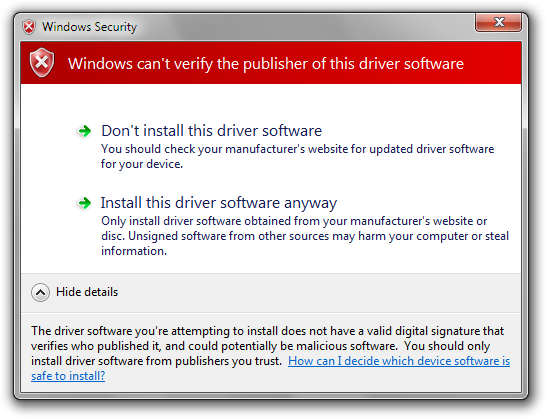
- A warning appears like this . select install anyway
![]()
- Now connect your mobile via usb cable and follow the instructions it should install drivers automatically
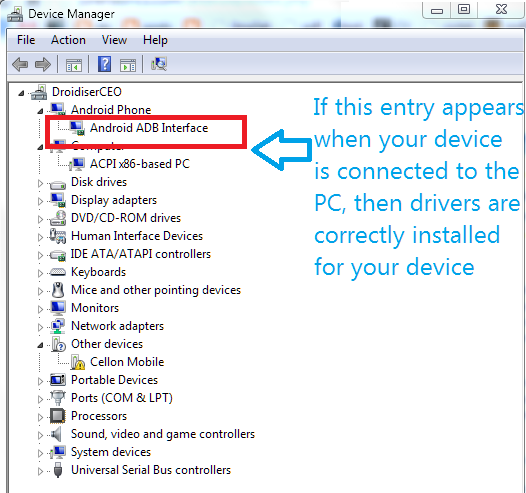
- If the drivers installed correctly your device manager on pc should look like this
![]()
- If everything went well proceed to rooting

Quote:
|
Root Your CELKON A98 with Bin4ry rooting tool |
Steps for Rooting :
1. Enable USB debugging on your device.
2. Go to Settings-- > Development-- > USB debugging check it.
3. Connect your device using storage mode to PC & Install driver.
4. Change phone connection to Media device.
5. Download bin4ary root tool from here
6. Unzip Bin4ry the root tool.It should contain these files

7. Run RunMe.bat file (Do notn Run as Administrator)
8. A command prompt will appear in green color like this

9. Now enter your choice
- 1 for normal mode
- 2 for special mode
- X for unrooting
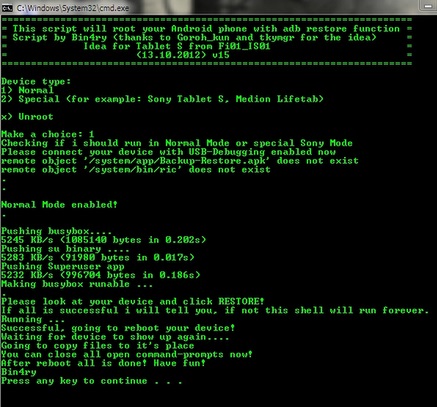
11. Follow the instruction on the cmd and click restore on your phone when prompted
12. Now your Phone should be rooted and you should be able to see Superuser app in your applist
13. If the above method didn't work try selecting choice as 2(special) in step 10
Quote:
|
Check whether your phone is rooted |
2. If it is rooted it should show status as ROOTED

HIt thanks :good: if you find this tutorial useful ;)
Credits :
Quote:
|
Caution : I am not responsible for any damages done to your phone through this guide . Use at your own will . But this is a tested tutorial on my friend's device . So not to worry much